Open any feed and count how many videos have words on screen. Nearly all of them. Now read those words while the creator talks — most of the time, the text is saying exactly what the voice is saying.
That’s a wasted channel. A large share of feed viewing happens with sound off, which means for a big chunk of your audience the overlay isn’t a supporting element. It’s the entire video. And if all it does is transcribe your voice, you’ve spent your only working channel repeating yourself.
What a text overlay is actually for
A text overlay is on-screen text placed over your footage — distinct from captions, which transcribe speech for accessibility. Captions follow what you say. An overlay carries information of its own.
That distinction is the whole thing. Once you separate them, a useful rule falls out:
The overlay should say what your voice doesn’t.
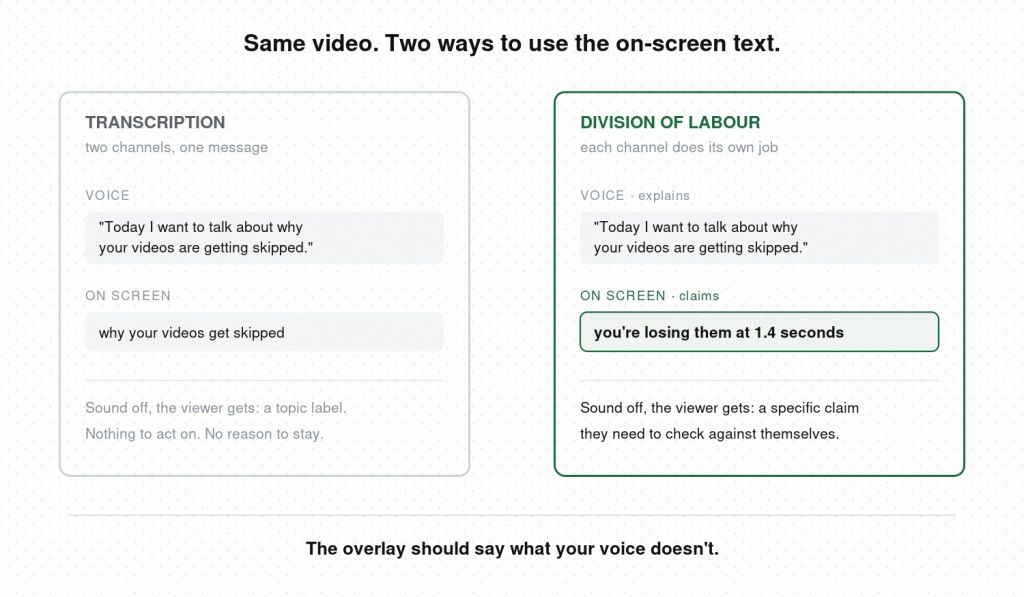
Your voice has time and nuance. It can explain, qualify, build. On-screen text has neither — it gets about two seconds of a stranger’s attention and has to land whole. So give each channel the job it’s built for. Voice explains. Text claims, labels, or promises.
The moment you apply this, the writing changes. A video where you say “today I want to talk about why your videos are getting skipped” pairs badly with an overlay reading “why your videos get skipped.” It pairs well with an overlay reading “you’re losing them at 1.4 seconds.”
Where most overlays go wrong
Three failure modes, in order of how often they show up:
Transcription. The text repeats the audio word for word. Two channels, one message. Auto-caption tools encourage this by default, because they’re built to transcribe. The fix is a sequencing change: lock the voiceover first, then write the overlay as a separate pass, with the audio muted so you can hear what’s missing.
Decoration. Text that carries no information — your name, a topic label, a hashtag, the video’s category. It occupies the most valuable real estate on screen and returns nothing. If removing a line of text would cost the viewer nothing, it was costing you something.
Overload. Long sentences, small type, three lines competing at once. In a feed, a viewer decides whether to read before they decide whether to watch, and text that looks like work gets skipped as a block — including the good line buried in the middle of it.
You’ll notice good overlay writing more often than you can reproduce it, because it goes past in a second and a half. Hookova saves any TikTok, Reel, or Short in one click and returns it broken down second by second — including what’s on screen, when it appears, and how it relates to the spoken line — so the overlay you admired becomes a structure you can go back and study.
What to put on screen, by format
If you run faceless or multi-account content. The overlay carries everything. There’s no face to hold attention and no personality to attach to, so frame one’s text is the hook. Write a complete premise the viewer can act on immediately — “there’s a town in Norway that pays you to live there” works alone; “Norway facts” doesn’t. This is the format where an overlay spec is worth writing down and reusing: word count, position, timing, all fixed, so a winning format can be run ten times.
If you teach or explain things. Put the conclusion on screen and let your voice do the reasoning. Viewers who only read the text still leave with your point; viewers who listen get the argument behind it. This also fixes the static-frame problem that hurts locked-off talking-head content — a text change is a visual change, and it resets attention without a cut.
If you film for a local business. Text carries the specifics your voice shouldn’t have to: price, hours, neighbourhood, what’s available today. Keep it out of the bottom fifth and the right-hand column where platform UI sits, because that’s exactly where an address ends up hidden behind the share button.
If you make skits or short drama. Overlay text works as a second voice — the internal thought, the label, the narrator who disagrees with what’s happening. A deadpan line on screen over a chaotic frame creates the contrast scripted formats run on, and it costs nothing to shoot.
The first overlay and the rest do different jobs
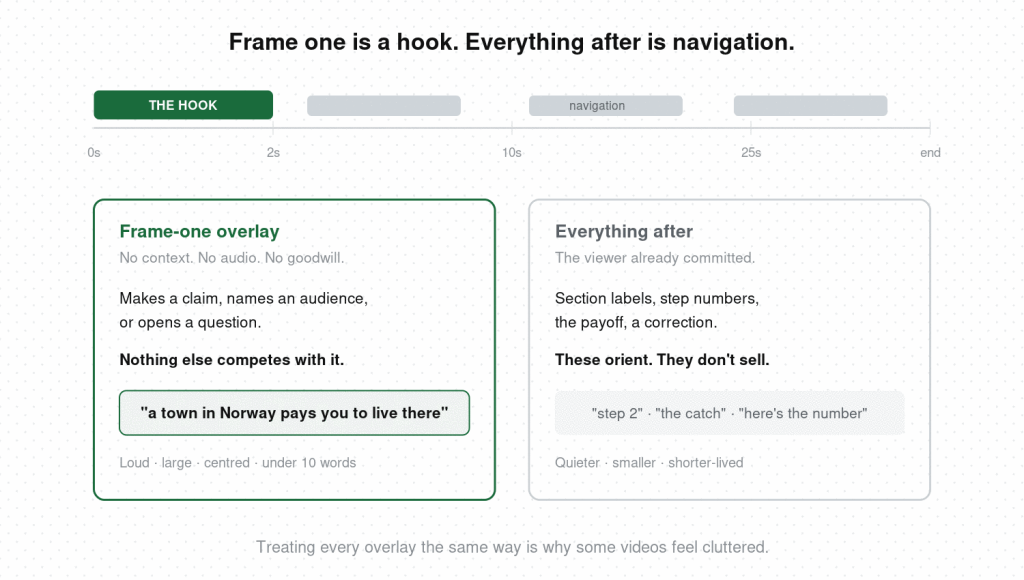
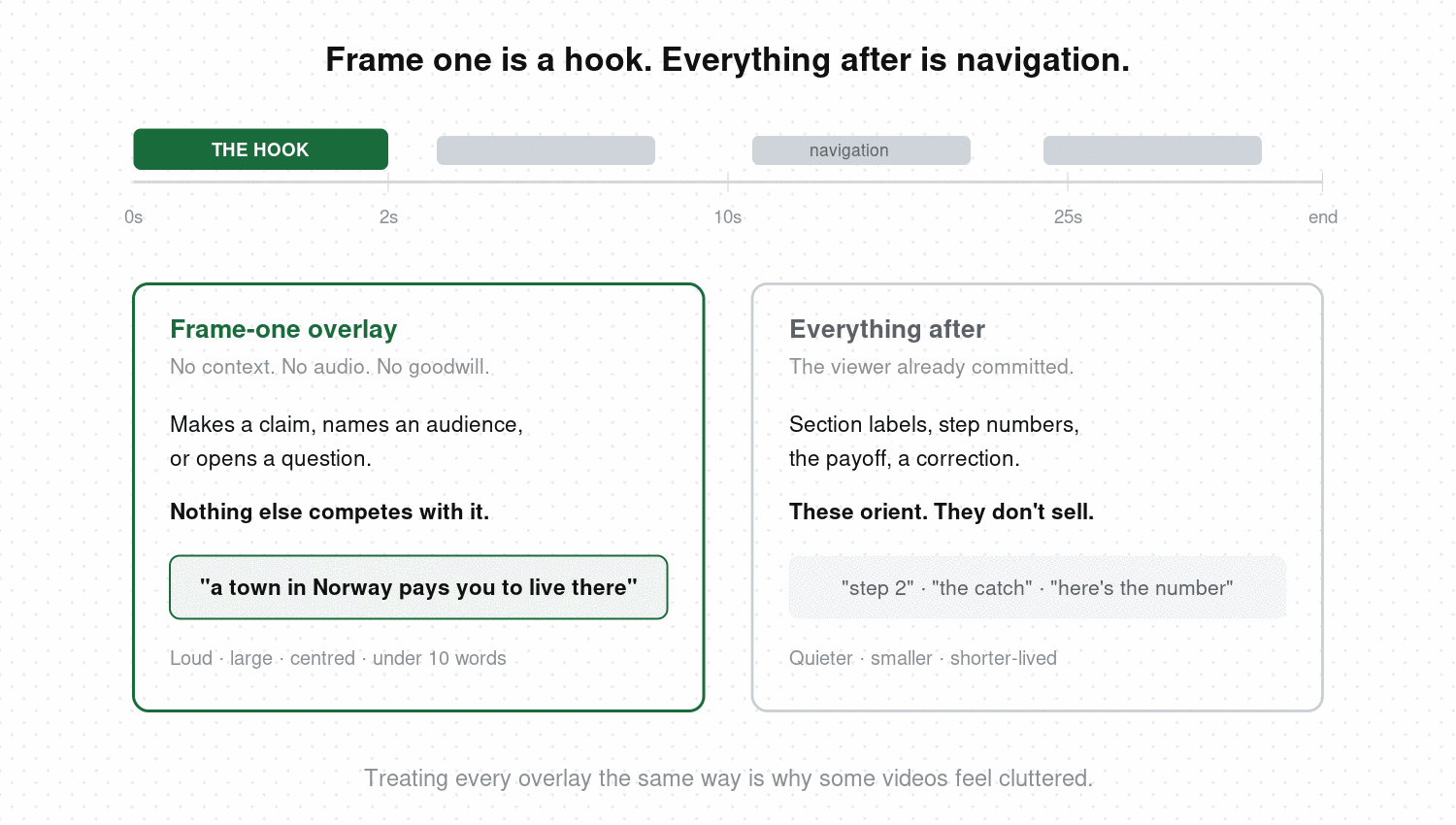
Treating every piece of on-screen text the same way is why some videos feel cluttered while others feel designed.
The frame-one overlay is the hook. It has to work with no context, no audio, and no goodwill. It makes a claim, names an audience, or opens a question. Nothing else on screen should compete with it.
Everything after is navigation. Section labels, step numbers, the payoff line, a correction to what you just said. These orient a viewer who’s already committed, so they can be quieter, smaller, and shorter-lived.
If you’re on camera, the frame-one overlay also has to cooperate with your opening line and where your eyes are pointed. Text that says one thing while you say another splits attention at the exact moment you can least afford it. The reliable pattern is text making the claim and your voice starting to back it up.
The mechanics that decide whether it gets read
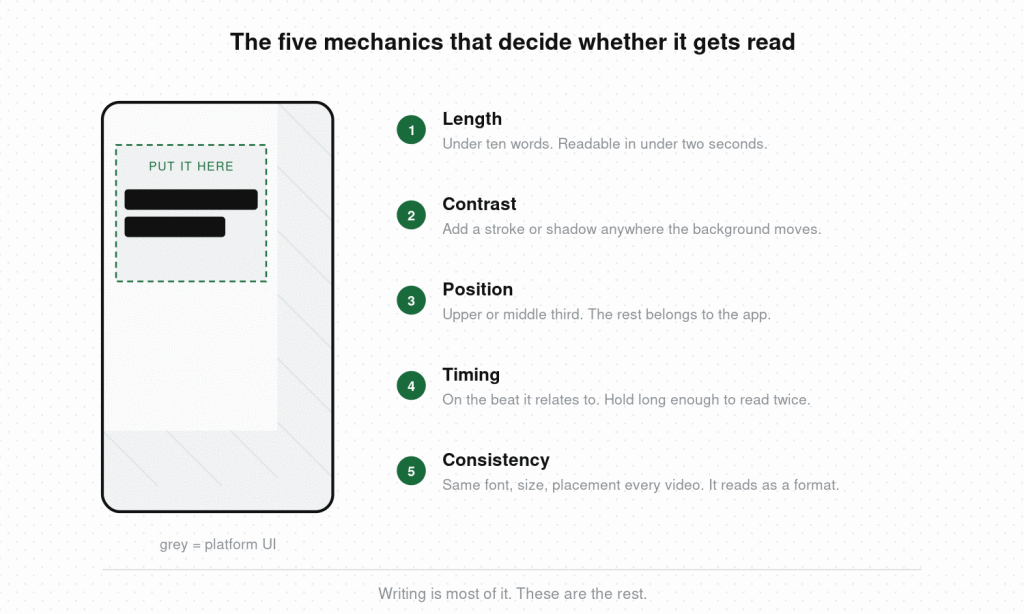
Writing is most of it. These are the rest.
Length. Aim for something a person can read in under two seconds — usually under ten words. If it needs a second line, cut it or split it across two beats.
Contrast. Light type on dark footage, dark on light, and a subtle outline or drop shadow anywhere the background moves. Text over busy footage without a stroke behind it is unreadable on half the frames it sits on.
Position. Upper or middle third. The bottom fifth and right edge belong to platform UI, and text placed there will be legible in your editor and covered in the app.
Timing. Text should appear on the beat it relates to and hold long enough to be read twice. Appearing a half-second late is a common and invisible error — the viewer’s eye moves to the text after the moment it was meant to frame.
Consistency. Same font, same placement, same size across your videos. It reads as a format, and returning viewers stop having to re-learn where to look each time.
FAQ
How many words should a text overlay be? Under ten for a hook frame, and readable in under two seconds. If you need more than one line, the overlay is probably doing work the voiceover should handle. Split long ideas across two separate overlays timed to different beats.
Where should text go on a TikTok or Reel? Upper or middle third. The bottom roughly 20% and the right-hand column are covered by platform UI — buttons, username, caption, audio label. Text there looks fine in your editor and disappears in the app, so preview an uploaded draft before publishing.
What font works best for video text overlays? A bold sans-serif at a size you can read on a phone held at arm’s length. Font choice matters far less than contrast and stroke — the same font is readable over dark footage and invisible over bright footage without an outline behind it.
How long should text stay on screen? Long enough to read twice at scrolling speed, which usually means two to three seconds for a short line. Text that leaves before it’s read is worse than no text, because the viewer registers that they missed something.
Do text overlays help with reach? Indirectly. They raise completion and rewatch rates for sound-off viewers, and those signals feed distribution. There’s no direct ranking bonus for adding text — the benefit comes from more people staying.
What’s the difference between captions and a text overlay? Captions transcribe spoken audio for accessibility and should stay accurate to what’s said. An overlay carries its own message and works best when it adds something the voice never says. Most videos want both, doing different jobs.
The hardest part is judging whether your overlay is pulling its weight or just echoing you. That’s difficult on your own footage and easy on someone else’s. Hookova breaks a finished video down second by second — on-screen text, spoken line, framing, and timing together — so you can see how the two channels divide the work in videos that held your attention. For the full range of opening techniques it recognizes, see the video hooks guide.